Urban deployment case study
Rooftop DJI Dock 3 Deployment for Urban Inspection
Unused elevated space can become a dedicated launch and charging point for repeatable building, property, construction, and urban-infrastructure inspection missions.
Field configuration
A defined operations point above ground traffic
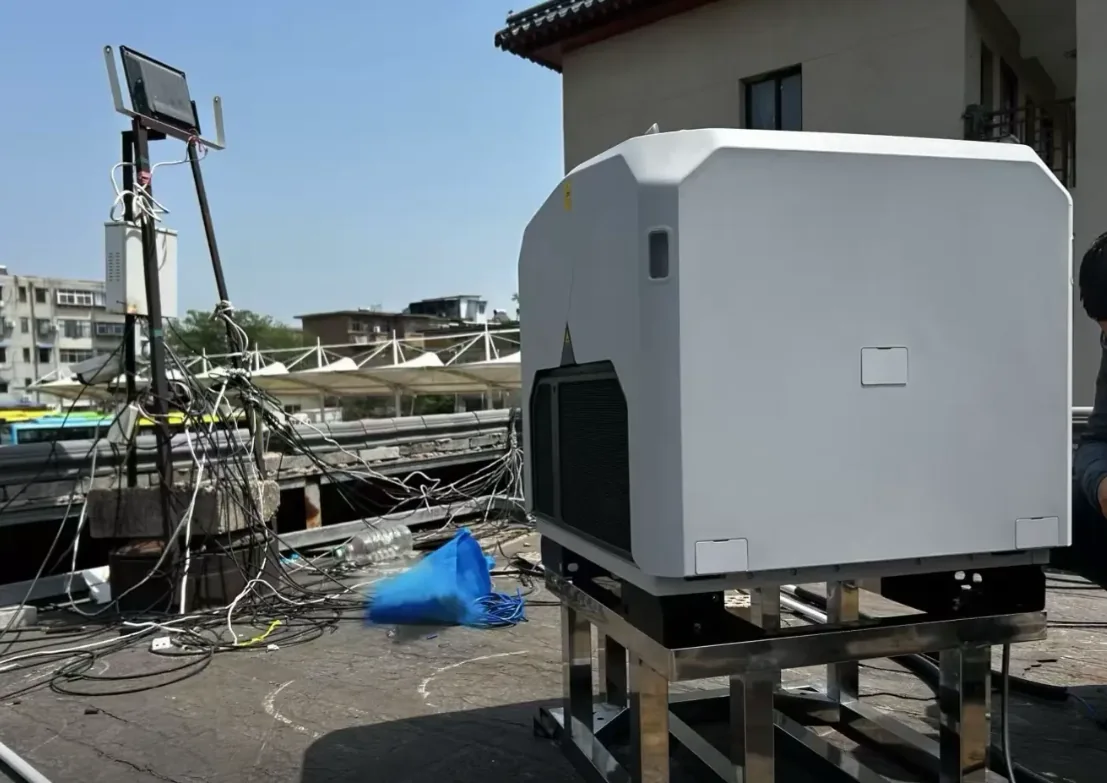
The supplied image shows DJI Dock 3 on an elevated metal support frame above an existing roof surface in a dense built environment.
- Deployment
- Fixed rooftop
- Best fit
- Buildings & campuses
- Inspection
- Visual & thermal
- Workflow
- Repeatable routes
01 / Site logic
What this rooftop Dock 3 case shows
The elevated frame is a practical approach when an operator wants to avoid placing the dock directly in pedestrian, vehicle, or equipment traffic at ground level. It creates a defined operations point while keeping the dock close to existing building infrastructure.
The dock itself is only one part of the installation. The surrounding roof, support frame, drainage, cable routing, nearby antennas and structures, maintenance path, GNSS visibility, wind exposure, and takeoff and landing volume all affect whether the location is suitable.
For property owners, construction teams, campuses, data centers, commercial buildings, and urban infrastructure operators, rooftop deployment can add repeatable aerial inspection without consuming valuable ground-level space.
Why rooftops can be strong locations
Ground-level space in dense environments may be occupied by vehicles, loading areas, visitors, machinery, landscaping, security barriers, or public access. A rooftop separates the drone operating point from much of that activity.
Elevation can improve the launch environment by starting above many low-level obstructions and close to common inspection targets such as roofs, mechanical systems, and façades. It does not remove the need for obstacle analysis.
Many commercial and industrial roofs also have power distribution, communications pathways, equipment rooms, or cable routes nearby. Where the building design allows, these services can support a cleaner permanent installation.
02 / Mission fit
Urban building inspection use cases
- Roof monitoringDocument membranes, drainage areas, penetrations, parapets, skylights, and visible change after severe weather or maintenance.
- Façade inspectionCapture high-resolution records of walls, cladding, windows, joints, and exterior areas that are difficult to inspect from the ground.
- HVAC checksObserve cooling equipment, vents, piping, and rooftop assets before technicians are dispatched for hands-on maintenance.
- Construction progressCreate a consistent record of work progress, staging areas, material movement, and site change.
- Solar and energy assetsUse visible and, where appropriate, Matrice 4TD thermal data for rooftop solar arrays and other temperature-sensitive assets.
- Property monitoringRun predefined routes around a commercial property or nearby buildings where airspace, range, communications, and local rules permit.
Supplied deployment photography
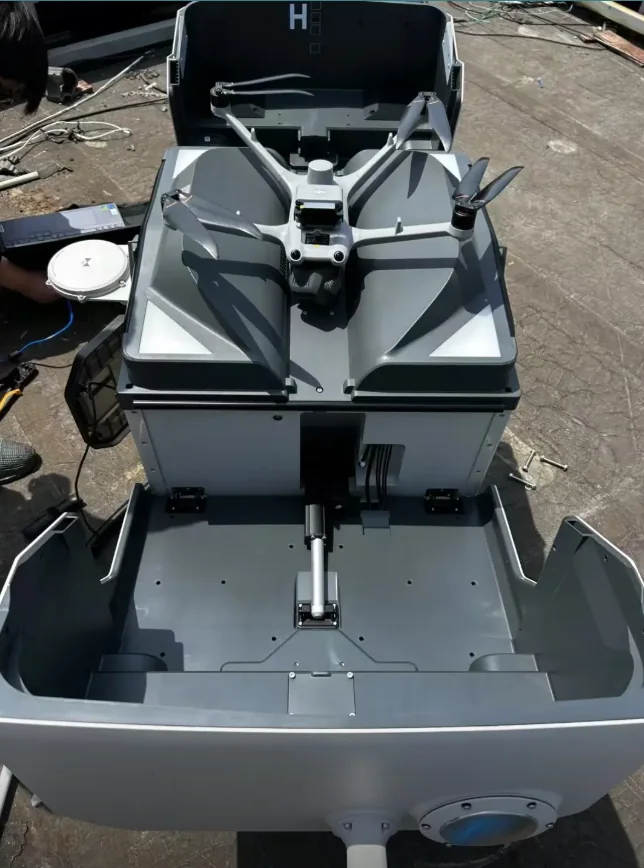
Aircraft ready for the rooftop workflow
The open dock image helps confirm clearance, access, and how the launch area relates to the raised support structure.
03 / Repeatability
From inspection evidence to maintenance action
The strongest reason to use a dock is the ability to repeat approved routes, camera actions, and data outputs—not merely remote takeoff.
- DefineChoose roof zones, façades, equipment, and evidence frequency.
- DesignBuild routes around safe clearances and required image detail.
- CommissionValidate the dock, aircraft, network, software, and site procedure.
- RepeatRun scheduled or approved on-demand missions.
- ActCompare imagery, classify change, and create maintenance tickets.
Consistent viewpoints make it easier to compare conditions across weeks or months. A facility team can review current imagery against previous missions, classify visible changes, and send technicians only when a closer physical inspection is required.
04 / Engineering
Structure, wind, power, network, and people
A rooftop installation begins with structural review. The roof and support frame must be appropriate for the dock, environmental loads, maintenance access, and installation method. The design should avoid damaging roofing systems or creating drainage problems, and penetrations or permanent attachments should follow the building owner’s engineering and waterproofing requirements.
Wind exposure can be higher on a roof than at ground level. The site survey should consider prevailing winds, turbulence from nearby walls or equipment, and the clear volume needed for takeoff and landing. DJI publishes a maximum allowable landing wind speed of 12 m/s for Dock 3, but a project procedure may set more conservative limits.
DJI lists Dock 3 input at 100–240 V AC and maximum input power of 800 W. Permanent installations should consider surge protection, grounding, lightning protection, backup power, protected cable containment, network reliability, and maintenance isolation.
The roof must remain safe for people. Access paths, guardrails where required, fall protection, service clearance, emergency isolation, and restrictions around the launch area should be planned with the facility safety team.
Choosing the rooftop position
The best position is not always the highest point. Balance flight clearance, structural suitability, GNSS visibility, communications, cable length, drainage, maintenance access, security, and distance from exhaust outlets, metal obstructions, cranes, antennas, and cooling equipment.
Review planned routes before fixing the final mounting position. Façade inspection may require different clearance than a rooftop solar mission. If one station must cover several buildings, validate route geometry, the regulatory operating area, and network performance rather than assuming from a map.
05 / Decision
When a rooftop dock makes more sense than ground installation
Choose rooftop deployment when the building is the main inspection target, ground space is constrained, the roof offers better separation from traffic, and the site supports the structural, electrical, network, and safety requirements. It is especially attractive for commercial properties, campuses, warehouses, construction sites, and facilities with regular exterior inspection.
Choose a ground installation when the roof creates excessive structural complexity, difficult maintenance access, severe wind exposure, poor cable routes, or restricted flight geometry. Compare both options during the site survey before finalizing the mount.
For a broader system comparison, review the DJI Dock 3 platform, Dock 3 + Matrice 4TD thermal solution, and DJI FlightHub 2 remote-operations layer.
Site questions
Frequently asked questions
Can DJI Dock 3 be installed on a rooftop?
Yes, when the roof and installation meet structural, power, network, grounding, weather, maintenance, safety, and flight-clearance requirements. Complete a site survey and engineering review before installation.
What can a rooftop drone dock inspect?
Typical targets include roofs, façades, HVAC equipment, solar panels, construction areas, building perimeters, and other assets suited to repeatable aerial observation.
Does a rooftop installation need lightning protection?
Evaluate lightning and surge protection as part of the building electrical and grounding design. The solution depends on the site, existing protection system, local standards, cable routes, and installation method.
Is a rooftop always better than a ground installation?
No. Rooftops can improve separation and access, but may add structural, wind, maintenance, and electrical complexity. Choose the location from the mission and site survey.
Can Matrice 4TD be used for rooftop thermal inspection?
Yes. Matrice 4TD is the thermal-focused Dock 3 aircraft. Thermal inspection still requires suitable conditions, camera settings, review criteria, and qualified verification where engineering decisions are involved.
Need a rooftop Dock 3 site review?
Turn the roof survey into a deployable scope
Share the building type, roof photos, dimensions, target assets, power and network availability, obstacles, deployment country, aircraft requirement, and mission frequency. Aeronestdock can define the hardware and deployment scope for quotation.